

When I started looking for a new smart thermostat, I wasn’t necessarily looking for the smartest one on the market. I wanted something simple, easy to use, and compatible with the smart home devices we already have. That’s what eventually led me to the LUX TQ1 Matter Smart Thermostat.
We previously had a Google Nest thermostat, and while I liked being able to control the temperature remotely, I wasn’t a huge fan of its touch-sensitive ring. It wasn’t particularly intuitive for my parents, who aren’t very tech-savvy. Even something as simple as changing the temperature could be frustrating.
That got me thinking about what actually makes a smart thermostat good.
After researching different models, including Sensi and ecobee, I decided the LUX TQ1 Matter Smart Thermostat was the best fit for our home.
I’ve been using the TQ1 since October 2025, and here’s why I chose it, what I like about its design and features, and a few things I think are worth knowing before buying one.
Why I Chose the LUX TQ1 Matter Smart Thermostat Over Google Nest
What I Didn’t Love About Google Nest
Google Nest was our previous smart thermostat, and for the most part, it did what we needed.
But there was one thing we never really loved: the touch-sensitive ring control.
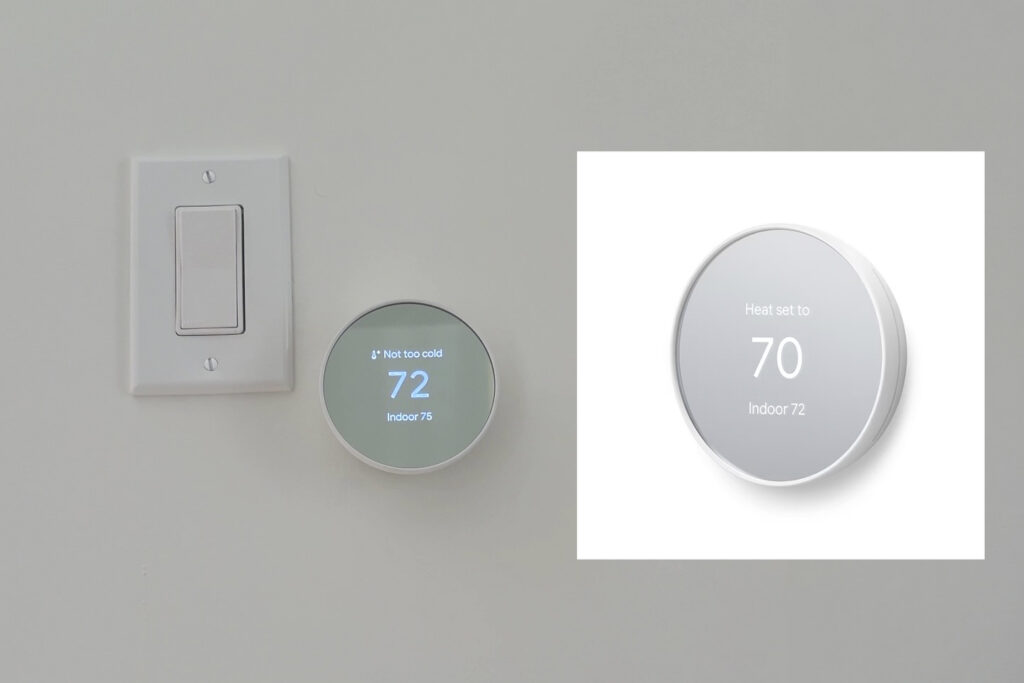
Personally, I could figure it out, but it wasn’t particularly intuitive for everyone in the house, especially my parents.
They just wanted to walk up to the thermostat, adjust the temperature, and move on. Instead, something that should have been straightforward required getting used to a different way of interacting with the device. I know this sounds like a minor inconvenience, but I think it’s an important consideration when choosing smart home devices, especially for a multigenerational household.
A smart thermostat shouldn’t require everyone in the family to be tech-savvy.
Another factor was our smart home ecosystem. We primarily use Amazon Alexa, not Google Home. Although Nest can integrate with Alexa, I preferred something that worked more directly with our existing setup.
My Experience Using the LUX TQ1 Matter Smart Thermostat
1. A Touchscreen That’s Actually Easy to Use
This is probably the biggest improvement over our previous Nest thermostat.
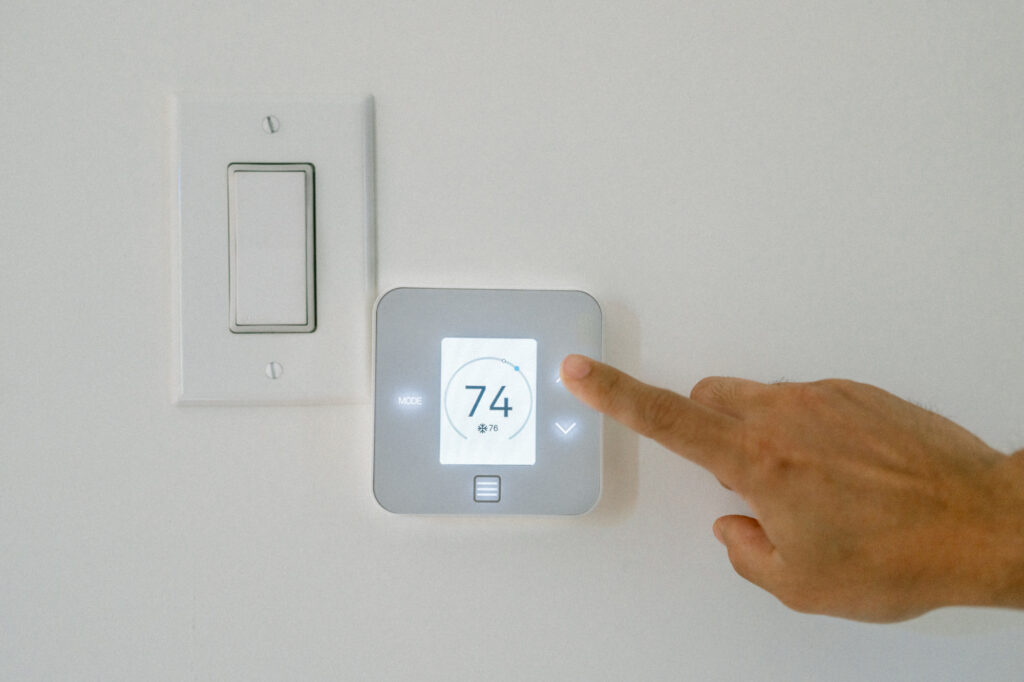
The LUX TQ1 Matter Smart Thermostat has a 2.4-inch color touchscreen, with the temperature clearly displayed and straightforward up and down arrows for making adjustments.
There’s no touch-sensitive ring to figure out.
For me, that’s a much more natural way to interact with a thermostat. You can simply walk up to it and adjust the temperature directly on the screen if you’d like. And that’s particularly important when my parents are staying with us.
I also appreciate that the basic thermostat controls and system configuration don’t depend on having an app open or even being connected to Wi-Fi.
It’s a small thing, but I like having a device that still works as a regular thermostat without relying on all its smart features.
2. Matter Compatibility Means One Less App
This was another major selling point for me.
Our home already has a mix of connected devices, including smart lights and switches, and Amazon Alexa is our primary smart home hub.
I don’t particularly enjoy downloading a separate app for every new device.
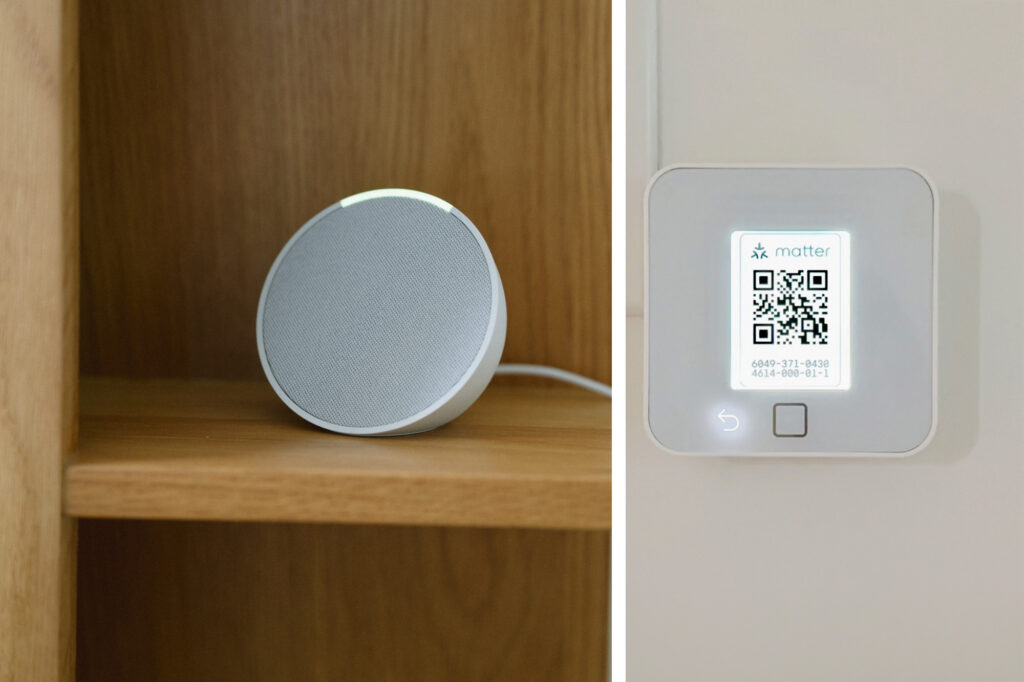
The LUX TQ1 uses Matter over Wi-Fi, which allows it to connect directly to compatible smart home platforms, including: Amazon Alexa, Apple Home, Google Home, Samsung SmartThings and Home Assistant.
Instead of creating another manufacturer-specific account, the TQ1 can be paired through a compatible Matter controller and managed using the smart home app you already use.
For our Alexa-centered setup, this is exactly the kind of integration I was looking for.
Matter also provides more flexibility if we eventually change smart home platforms. I like knowing that the thermostat isn’t tied exclusively to one brand’s ecosystem.
Of course, Matter doesn’t mean every smart home platform offers exactly the same controls or automation options. And you still need compatible Matter controller hardware and Wi-Fi for connected functionality.
But I appreciate the overall simplicity.
One less app to download and manage is always a plus in my book.
3. The Compact Design Looks Better on Our Wall
I think design is often overlooked when people compare smart thermostats.
Most reviews focus on features, connectivity, and energy savings. Those things are important, but the physical size and appearance matter too.
The TQ1 Matter Smart Thermostat measures approximately 3.5 × 3.5 inches, with a depth of around 1.1 inches.
It’s a compact square, and I personally prefer its proportions to the larger rectangular design of the Sensi ST25W, which is another model I looked at when researching for smart thermostat.
Since our thermostat is installed right beside a light switch, the smaller footprint makes a noticeable difference.
I also like the minimal interface. The temperature is easy to read without the display feeling overly complicated.
Overall, I think the TQ1 Matter Smart Thermostat looks modern without trying too hard to make a statement.
4. Scheduling Without Making Things Complicated
One of the main reasons to buy a smart thermostat is the ability to set a schedule around your daily routine.
The TQ1 supports seven-day scheduling, so you can program different temperatures throughout the day. What I appreciate is that the schedule can be configured directly on the thermostat and stored locally. That means the thermostat doesn’t need constant internet access just to follow its basic programmed schedule.
Alternatively, you can also set the schedule in Amazon Alexa, and control the temperature remotely when you are away.
5. A Few Smaller Features I Appreciate
Beyond the main features, there are a few practical details that make the TQ1 Matter Smart Thermostat worth considering.
PIN Lockout
The TQ1 Matter Smart Thermostat has a numeric PIN lockout feature that can prevent unwanted changes to thermostat settings.
With young children at home, I can definitely see the appeal of this feature.
Of course, I wouldn’t keep it locked all the time when my parents are visiting, since easy access is one of the reasons I chose this thermostat in the first place.
But it’s nice to have the option.
Energy-Related Information
The TQ1 Matter Smart Thermostat includes energy-use information and an indicator related to heating and cooling effort.
I wouldn’t treat these features as a substitute for measuring actual household energy consumption, but they provide additional information about how the system is operating.
For me, convenience and usability were the main reasons for upgrading. Potential energy savings are an added benefit rather than the deciding factor.
Installation and Compatibility: What to Know Before Buying
The TQ1 Matter Smart Thermostat is designed for DIY installation, although the actual process depends on your existing HVAC system.
It supports a variety of configurations, including conventional heating and cooling systems with up to two heating and two cooling stages, and heat pumps with up to three heating and two cooling stages.
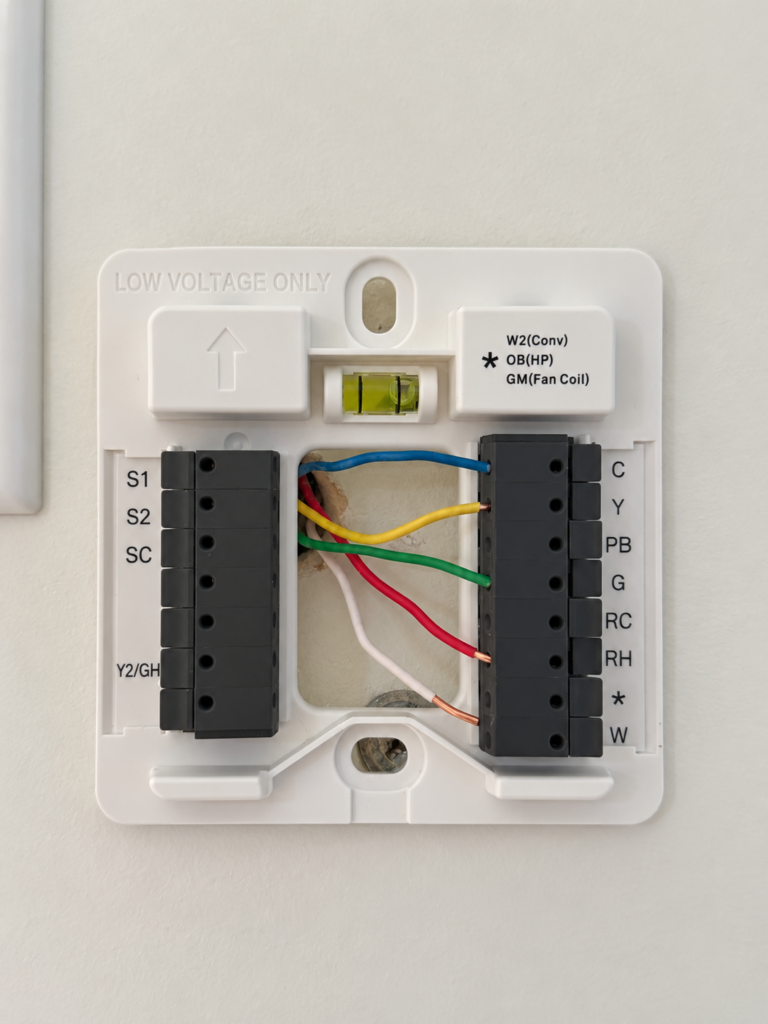
However, one thing you should check before buying is your thermostat wiring.
The LUX TQ1 Matter Smart Thermostat requires a C-wire for constant power.
If your current setup doesn’t have a C-wire, the LUX Power Bridge may be an option for certain compatible four-wire heating and cooling systems with Y and G wires.
The Power Bridge is sold separately, so it’s worth checking your existing wiring before purchasing.
The TQ1 also isn’t designed for 120V or 240V line-voltage heating systems.
I would always recommend checking the official compatibility information before replacing an existing thermostat rather than assuming all smart thermostats use the same wiring.
Is the LUX TQ1 Matter Smart Thermostat Worth It? My Final Verdict
After previously using Google Nest and researching alternatives like Sensi and ecobee, I’m happy with my decision to choose the LUX TQ1.
What I appreciate most isn’t necessarily an advanced feature. It’s how easy the thermostat is to use.
The touchscreen feels more intuitive than our previous Nest’s touch-sensitive controls, especially for my parents, who aren’t particularly tech-savvy. The compact design also fits better beside our light switch, and Matter compatibility means I can integrate it with our Alexa-centered smart home without downloading another dedicated app.
And then there’s the price.
At $79.99 (currently reduced from $94.99), the LUX TQ1 is considerably more affordable than many popular smart thermostats. For comparison, the standard Google Nest Thermostat retails for $99.99 (reduced from $129.99), the ecobee Smart Thermostat Essential for $109.00 (reduced from $140).
Below is a comparison chart I took from Lux TQ1 product page when doing my research. For our everyday needs, the TQ1 covers almost everything I was looking for: an intuitive touchscreen, matter over wifi, scheduling, remote temperature control, and Alexa integration. And it does so at a much more approachable price.
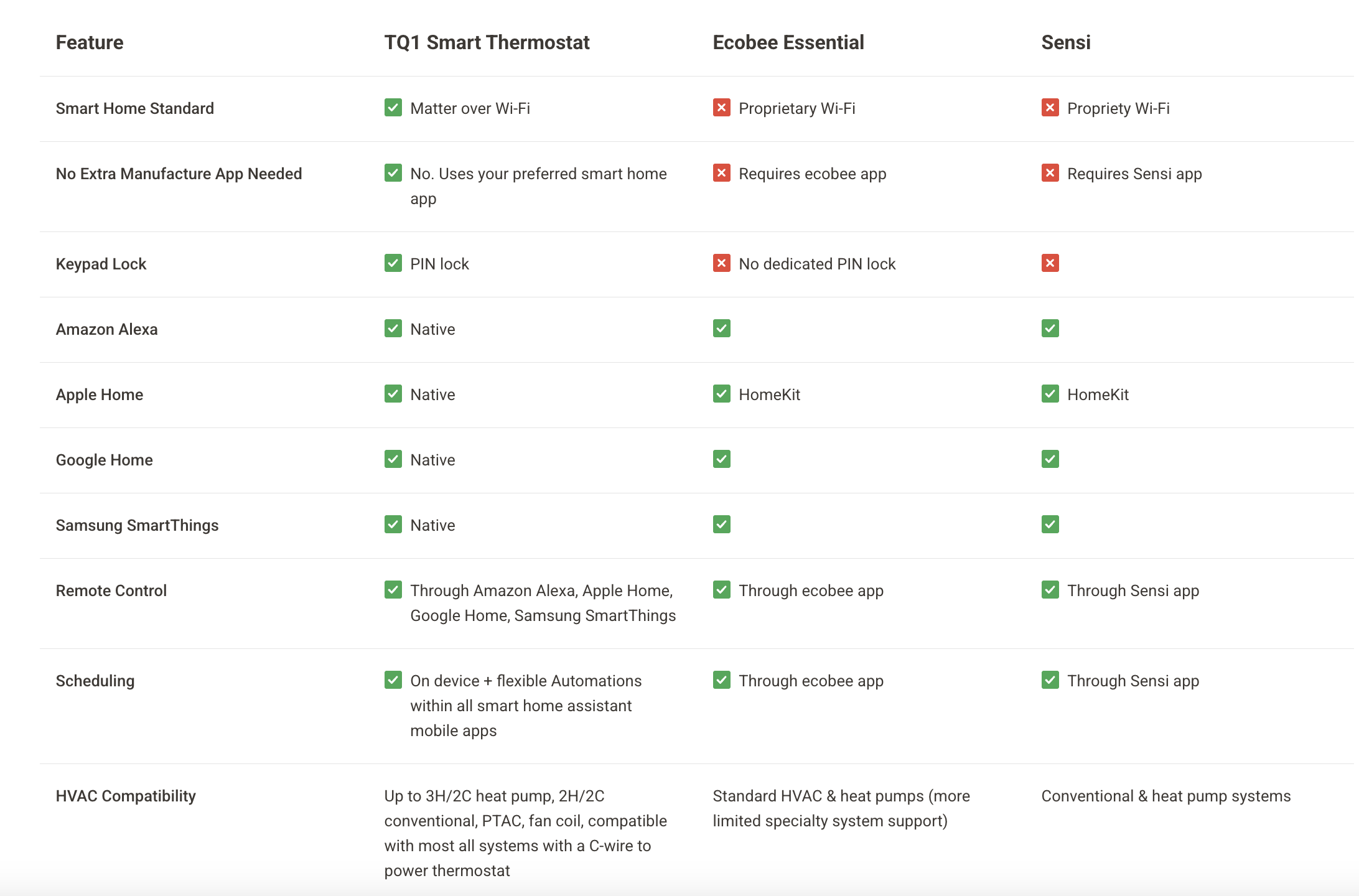
Would I recommend it to everyone? Not necessarily. If you’re looking for advanced room sensing or automatic occupancy-based adjustments, I’d consider spending more on the TQX or another premium model.
Sometimes the best smart home devices aren’t the ones with the longest feature lists or the highest price tags.
They’re the ones that make everyday life easier without asking you to think about them.
And that’s exactly what I was looking for.